Cookie consent for Laravel applications
Add GDPR cookie consent to a Laravel app — three Blade includes, your own database, Consent Mode v2 and pixel gating, no third-party requests. No consent vendor ships a Laravel package; this one is built for it.
or see all twelve platforms
Why Laravel sites need consent that actually blocks
Laravel is the dominant modern PHP framework, used for custom applications rather than off-the-shelf products. If you run a Laravel app with a public-facing front end and any marketing tracking on it, you need consent handling — and no consent vendor ships a Laravel package.
Installing on Laravel
01
Upload into public/
Copy the folder into the framework’s public/ directory, not the project root.
02
Add three Blade includes
Into the layout your public pages actually use — the one with the <html> and <body> tags. Credentials are read from .env.
03
Clear the view cache
What’s specific to Laravel
Find the right layout. Laravel projects put the main layout in several conventional places: resources/views/layouts/app.blade.php, resources/views/frontend/layouts/app.blade.php, or resources/views/components/layouts/app.blade.php. The one you want is whichever contains the <html> and <body> tags for your public pages — the guide lists all three so you know where to look.
Do not add the includes to a dashboard layout: visitors never see those pages, and your users would get a cookie banner inside the application. And clear the view cache — php artisan view:clear — because Blade caches compiled templates, and skipping it is the single most common reason a correct edit appears to have done nothing.

Included on Laravel, not upsold
No feature is held back for a higher tier. One plan, everything in it.
Google Consent Mode v2
The four signals GA4 and Google Ads need to run properly in the EEA — analytics_storage, ad_storage, ad_user_data, ad_personalization — set from your visitor’s real choice.
GTM, Meta & TikTok
Google Tag Manager, Meta Pixel and TikTok Pixel get base placement and consent-aware loading — no snippets pasted into your Laravel templates, no second plugin to gate them. Your tracking plan still defines the events and conversions.
One licence, one root domain
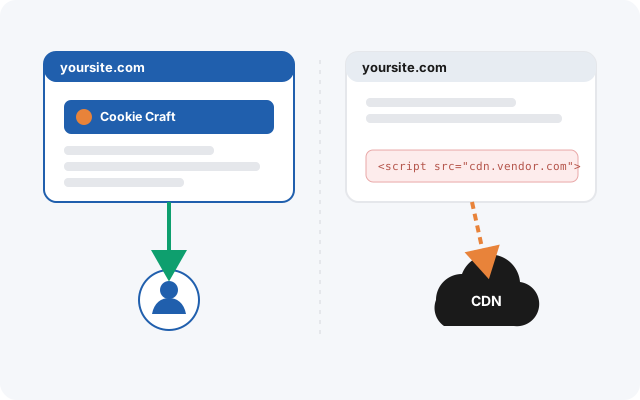
One root domain covers your app, its marketing site and any staging environments under it — on any platform — with no runtime dependency on anyone else’s CDN.
A guide for your exact site
Your install guide is generated with your real Laravel paths already filled in, in twelve languages — no example.com placeholders to translate into your own setup.
Why it matters here
For a Laravel team, the calculation is straightforward: implementing correct consent gating yourself means handling Consent Mode v2’s four signals, script blocking before consent, consent persistence, a configurable banner, and keeping all of it current as Google changes requirements. That is not a weekend task, and it is not the part of your product that differentiates you.
Cookie Craft gives you that as a component in your own codebase — which means your page load does not depend on a vendor’s CDN being up.
What it does — and what it doesn’t
Cookie Craft does not scan your Laravel site to discover cookies automatically, and it does not write your privacy policy for you. It gives you the mechanism: a banner your visitors actually interact with, real blocking of the scripts you configure, and correct Consent Mode v2 signals to Google. What you declare in it is up to you.
Consent for Laravel, done properly.
Self-hosted, first-party, and everything included — €25/month or €240/year per root domain.